macOS · Windows Your files never leave your computer

Open anything.
Edit as Markdown.

Double-click a Word file, a spreadsheet, a slide deck, a PDF or a scan. Anymark turns it into clean Markdown on your own computer, lets you edit it like a normal document, and saves it as a normal ".md" file next to the original.

No vault.No workspace.No upload.

7-day trial, every feature included. One payment, free updates and upgrades for life.

Supported files
Documents.docx .doc .rtf .odt .pages
Spreadsheets.xlsx .xls .ods .numbers .csv
Slides.pptx .ppt .odp .key
PDF and scans.pdfOCR in 21 languages
Web, data, code.html .json .xml40 languages
Markdown.md .txtedited in place
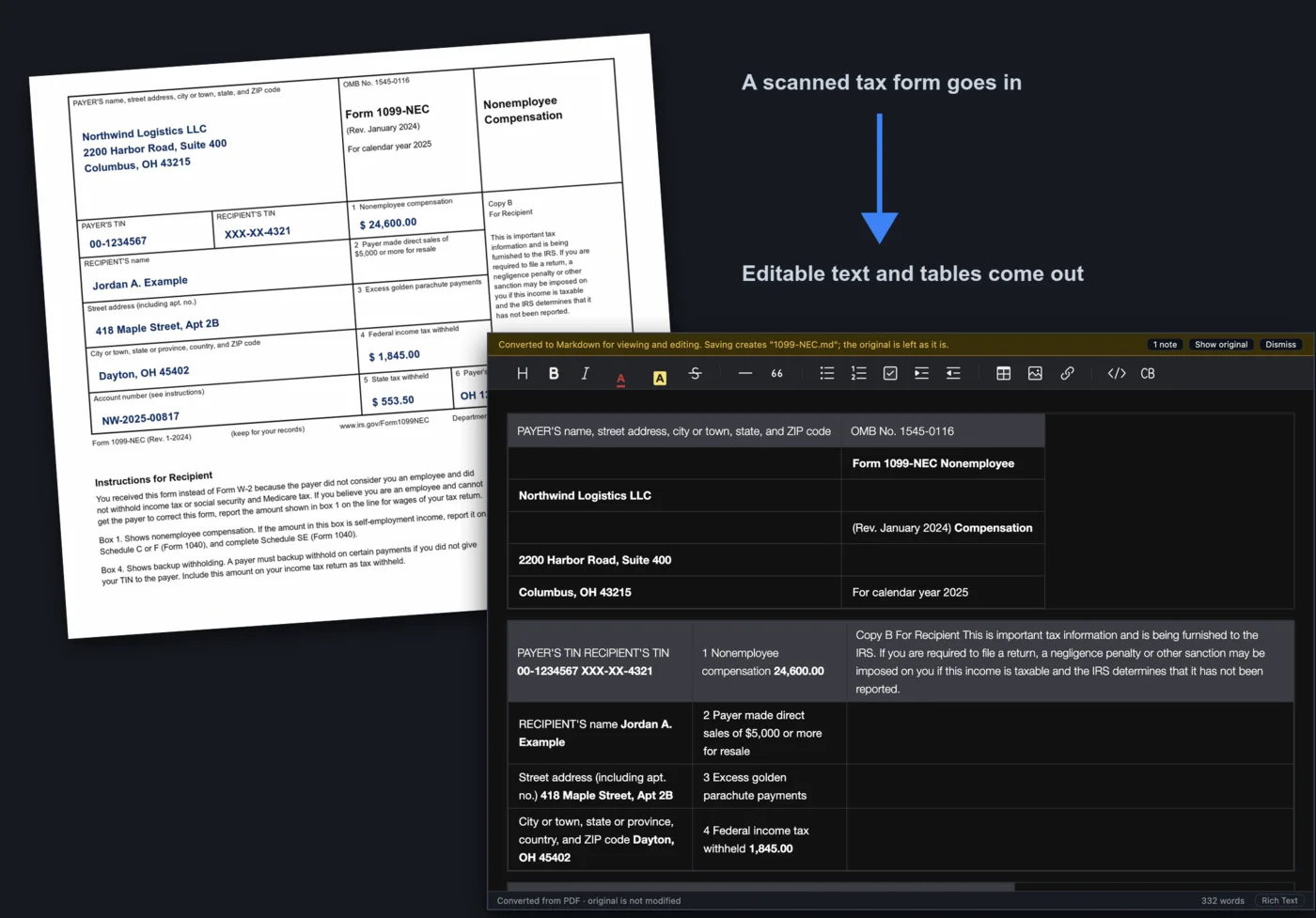

Anymark opening a Word report, a spreadsheet and a PDF and showing them as editable Markdown

Why Anymark

Markdown is where your notes live. Your documents are not.

📂

Opens the file you have

Word, Excel, PowerPoint, PDF, RTF, OpenDocument, Pages, Numbers, Keynote, HTML, CSV, JSON and code. Double-click, read, edit, save as Markdown.

🔒

Files never leave your computer

Conversion and OCR run on your Mac or PC. No account, no cloud, no telemetry. Tax forms, contracts and statements stay yours.

🗂️

No vault, no workspace

Nothing to import, nothing to move in to. Files stay where they are; Anymark writes a plain .md beside the original and never touches it.

✍️

Edit like a word processor

Rich text with headings, lists, tables, links, text colour and highlight. One key shows the Markdown source. Find and Replace, Print, Export as PDF.

📚

Batch conversion

Point it at a folder and every document inside, subfolders included, becomes Markdown, with a report of what was done. Same engine on the command line.

🔍

Scans read offline

Built-in OCR in 21 languages. Pages fed in sideways or upside down are turned the right way, cleaned, and read into paragraphs, lists and tables.

📊

Tables survive

Ruled, half-ruled and unruled PDF tables, merged spreadsheet cells, several tables on one sheet, alignment and bold totals kept.

♾️

One payment, for life

$9.99 once. Every update and every future version included, on up to three of your own computers. No subscription, ever.

Features

Built for the documents people actually send you

PDFs become structure, not soup

A PDF stores positioned letters, not paragraphs. Anymark rebuilds the reading order across columns, re-joins paragraphs, finds the headings, lists and links, and keeps tables as tables: ruled grids, tables with horizontal rules only, and tables with no rules at all.

  • Column alignment, bold labels and totals kept
  • Centred and right-aligned paragraphs stay that way
  • Pictures, logos, stamps and signatures saved beside the file
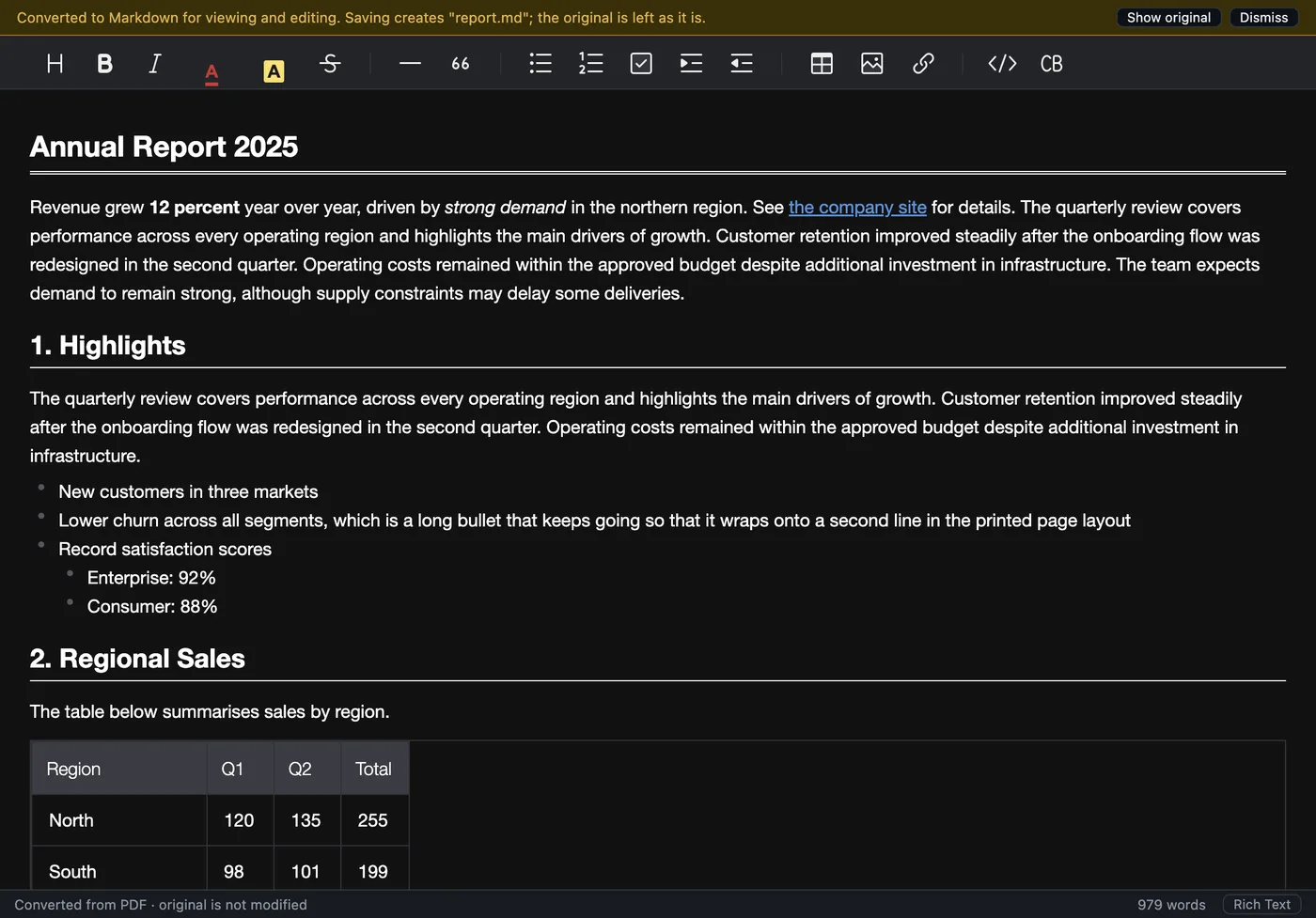
A PDF annual report converted to Markdown with headings, a bulleted list and a sales table

Scans and photographed pages, read offline

Built-in OCR with no internet needed. English is included and twenty more languages can be added from the menu. Sheets fed in sideways or upside down are turned the right way, show-through and ruling lines are cleaned away, and the result keeps its paragraphs, headings, lists and tables.

  • Forms drawn as a picture with typed entries are rebuilt from both layers
  • Fillable PDF forms keep what was typed, ticked and chosen
  • Barcodes, stamps and signatures are kept as pictures
A sideways scan of meeting minutes converted to editable text

Spreadsheets and slide decks, one section per sheet or slide

Excel files keep their displayed values, number and date formats and merged cells; hidden rows, columns and sheets are skipped. PowerPoint decks become one section per slide with the title, bullets, tables and speaker notes.

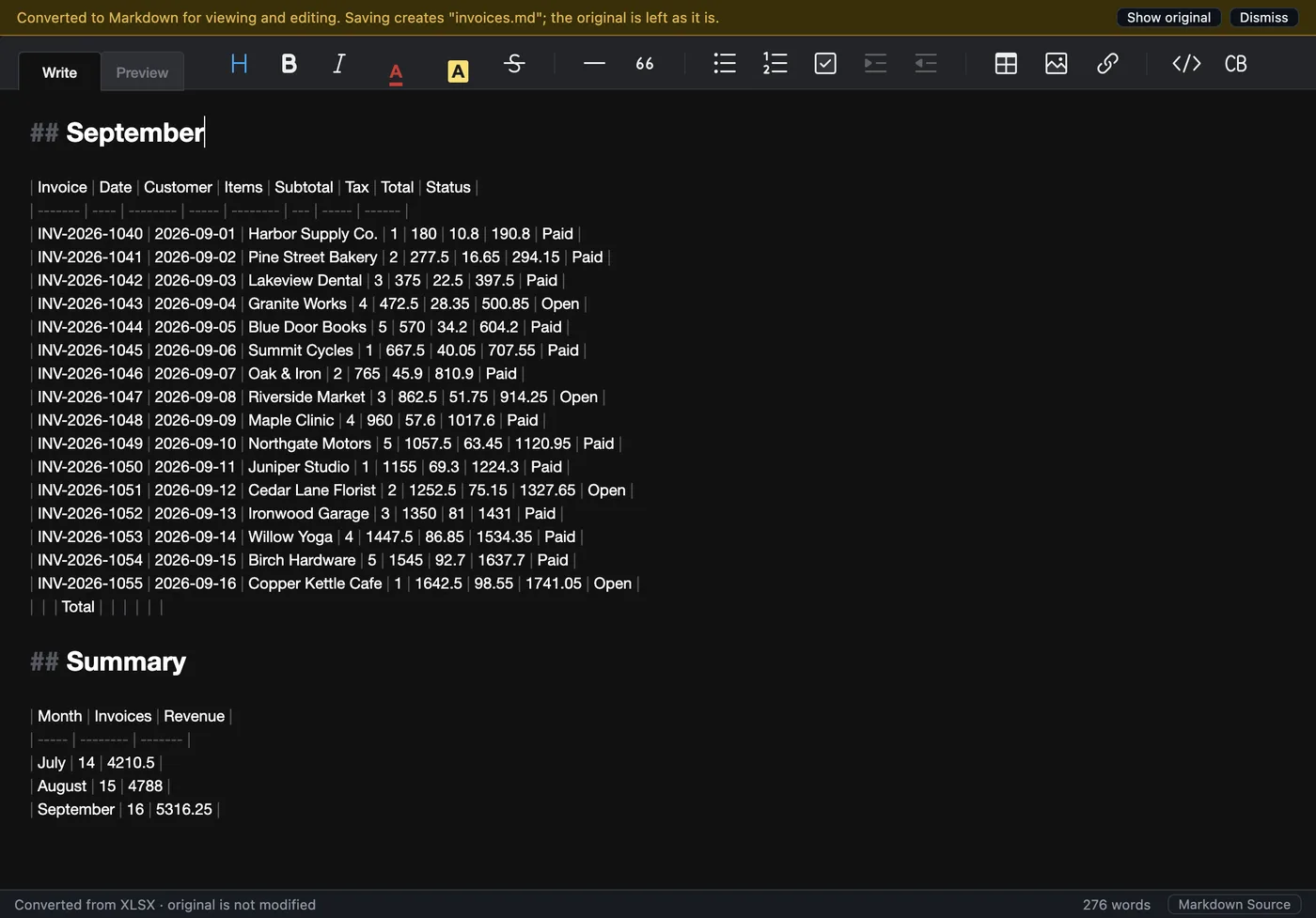
  • Several tables on one sheet are found separately
  • Merged cells survive editing and are written back
  • CSV and TSV open as a table, values exactly as written
An invoice spreadsheet shown as Markdown tables in the source view

Colour, highlight and the rest of the Format menu

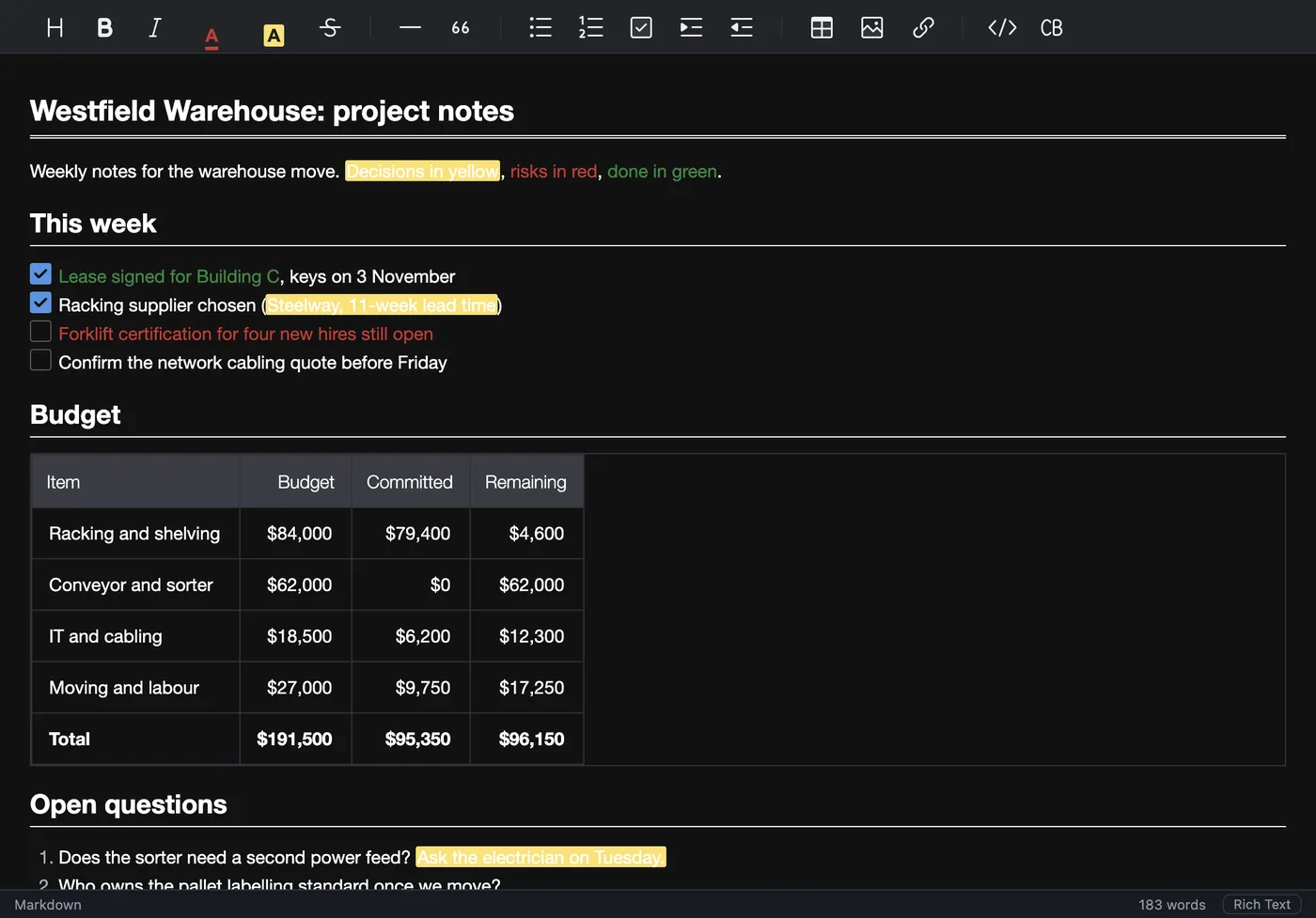
Mark a sentence in yellow, turn a warning red, add a heading, a list or a link, and switch to the Markdown source with one key to see exactly what will be saved. Colour and highlight are stored as the small bits of inline HTML every Markdown reader understands.

  • Find and Replace across the whole document, undoable
  • Print, Print Preview and Export as PDF
  • Word count, recent files, drag and drop
Project notes with yellow highlights, red and green text, task lists and budget tables

Convert a whole folder at once

Point Anymark at a folder and it converts everything in it, subfolders included. Output beside the originals or mirrored into another folder, with skip, replace or keep-both rules, a progress bar and a report of what was done. The same engine is on the command line for scripts.

  • anymark --convert report.doc > report.md
  • anymark --batch ./docs --out ./markdown
  • Pictures saved in a folder beside each file, or embedded
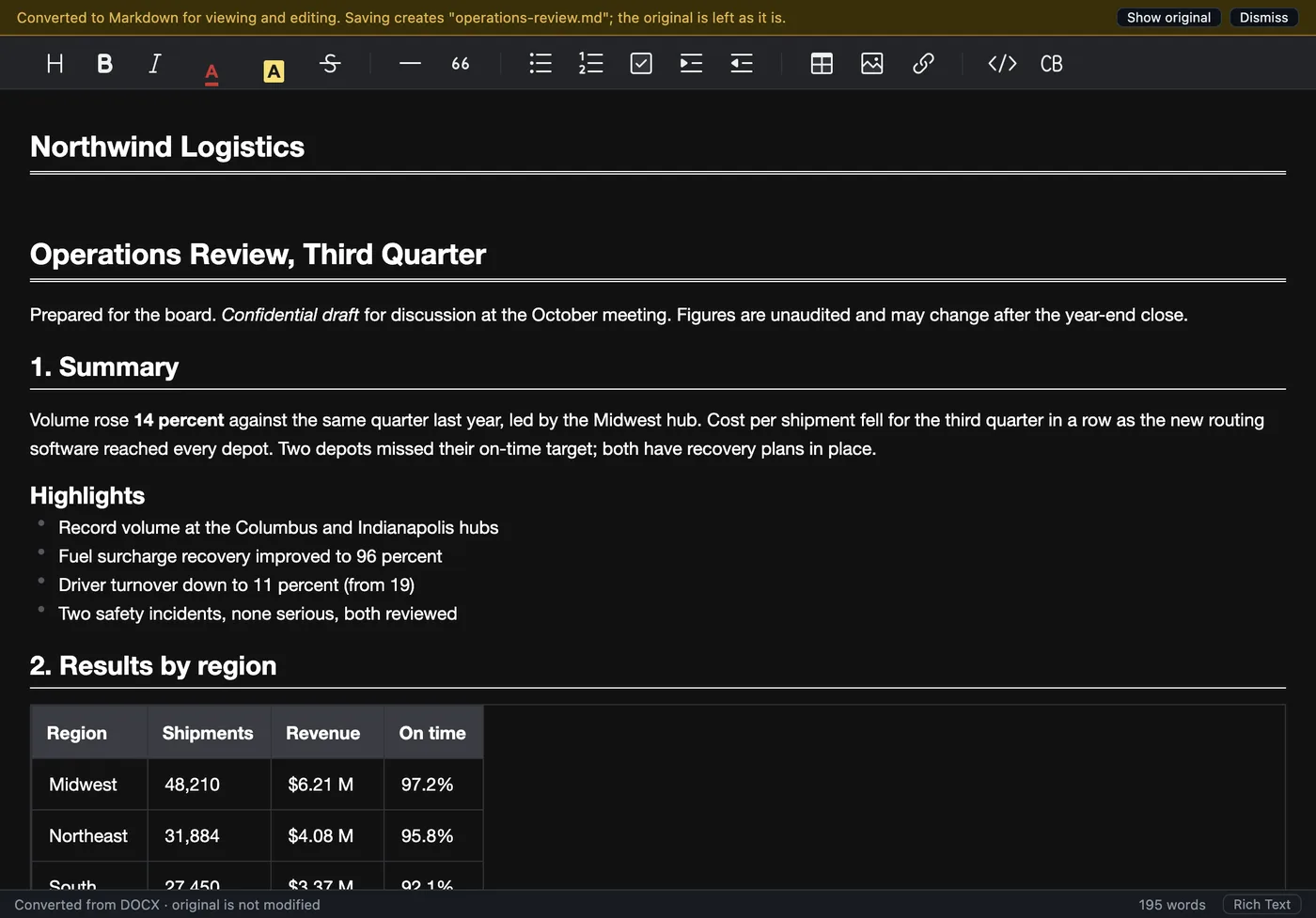
A Word operations review converted to Markdown with headings, lists and a results table

Supported formats

What goes in, and what you get

FormatExtensionsWhat you get
Markdown, text.md .markdown .mdx .txtOpened as-is, saved in place
Word.docx .docm .dotx .doc .dotHeadings, lists, tables with merged cells, emphasis, links, pictures, footnotes
Rich Text.rtfSame structure as Word, from any writer
OpenDocument.odt .ott .ods .odp .otpText, spreadsheets and presentations
Excel.xlsx .xlsm .xlsb .xlsOne section per sheet, displayed values, merged cells, several tables per sheet
CSV / TSV.csv .tsvOne table, values exactly as written
PowerPoint.pptx .pptm .ppsx .ppt .pps .potOne section per slide: title, bullets, tables, speaker notes
PDF.pdfReading order, headings, lists, links, ruled and unruled tables, pictures; filled-in forms; OCR for scans in 21 languages
Apple iWork.pages .numbers .keyText, tables and slides (files saved with a preview)
HTML, JSON, code.html .htm .json .js .py .css and 40 moreHTML as Markdown; JSON and code in fenced blocks

Installing Anymark never changes which app opens a file type. It appears in "Open With" and you decide.

Pricing

One price. Yours for life.

$9.99 once
  • Lifetime licence for one person, on up to 3 of your own computers
  • Every update and every future major version included
  • macOS (Apple Silicon and Intel) and Windows
  • 7-day free trial first, no card needed
  • 7-day money-back guarantee
Buy a lifetime licence

Secure card payment through Stripe. You receive the licence key by email within a minute.

Try it on the worst PDF you have.

The trial is the full app for seven days. If it saves you one afternoon of retyping, it has paid for itself many times over.